> ## Documentation Index
> Fetch the complete documentation index at: https://docs.flowscale.ai/llms.txt
> Use this file to discover all available pages before exploring further.
# What is ComfyUI?
> Build sophisticated GenAI applications without coding using visual workflows and production deployment
## What is ComfyUI?
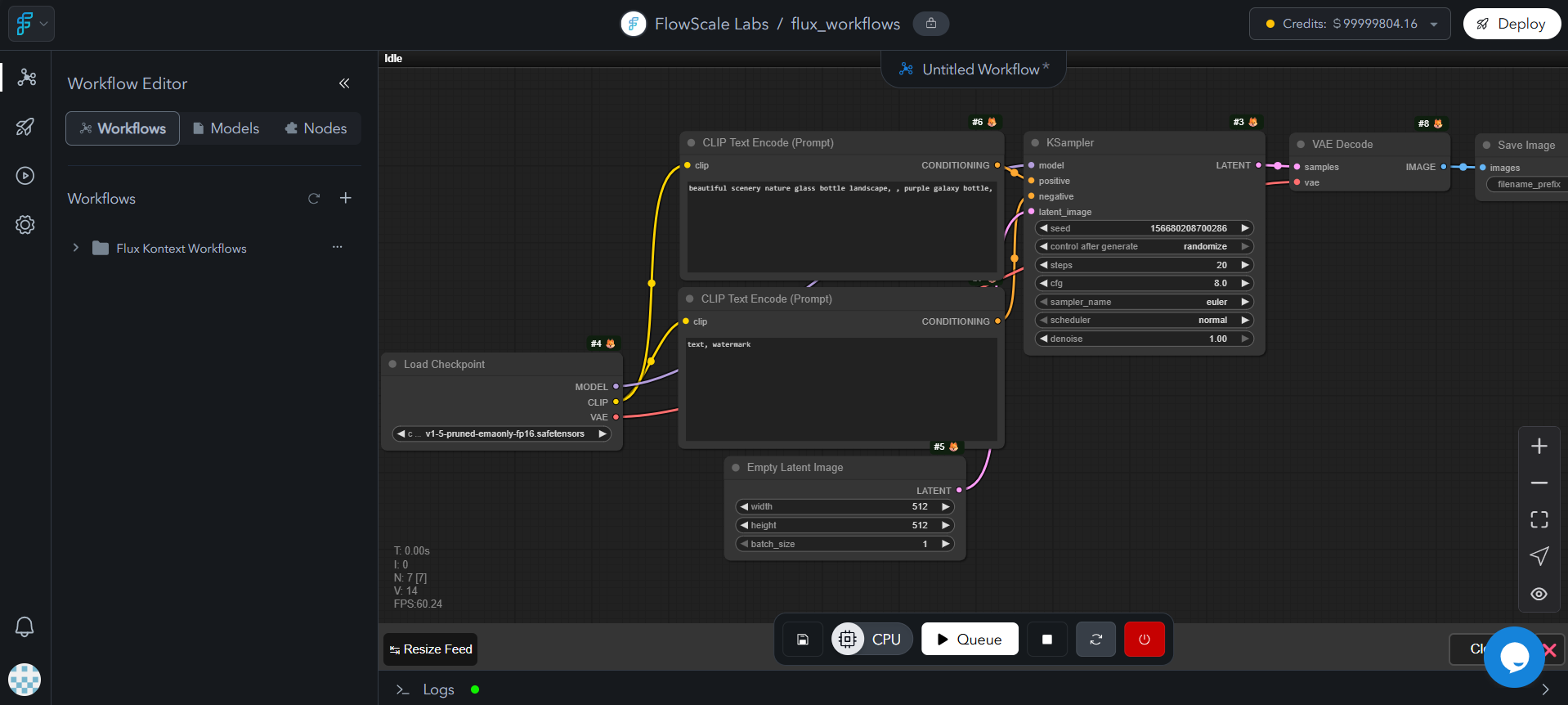
ComfyUI is a visual programming interface for building AI workflows using drag-and-drop nodes. Create sophisticated image, video, text, and audio generation workflows without coding. FlowScale AI deploys these workflows as production APIs.
{/* Image Description for Team: Split-screen screenshot showing ComfyUI workspace with complex workflow on left and clean API interface on right with transformation arrows */}
 ## Core Capabilities
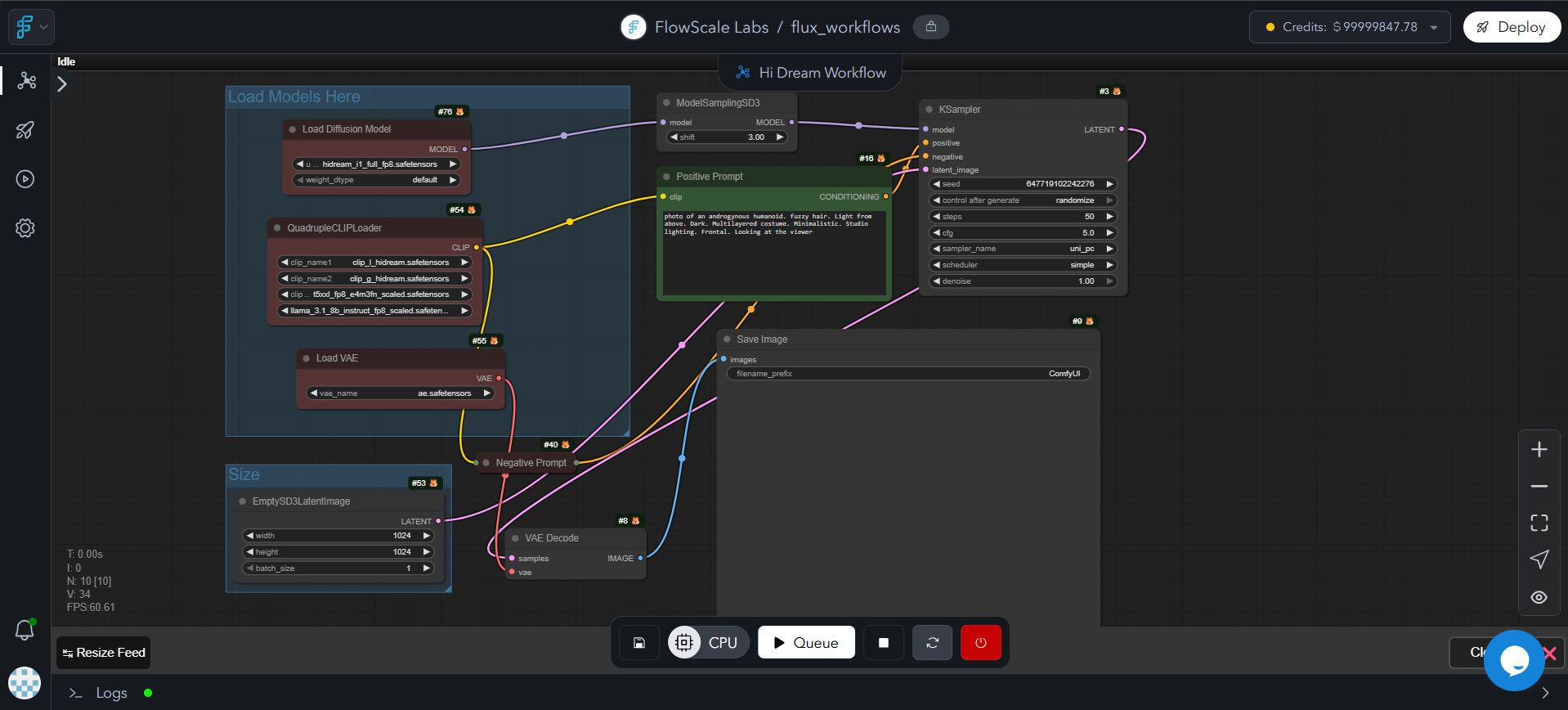 Build complex workflows for **images, videos, audio, and text generation**—all in one interface
Create conditional workflows, multi-step pipelines, and advanced AI operations without coding
Each block (called a *node*) does one specialized job—combine them to build enterprise-grade GenAI solutions
Works with any AI model, custom nodes, and runs anywhere—Windows, macOS, Linux, or cloud
Key features:
* **Visual Programming**: Connect nodes instead of writing code
* **Multi-modal**: Support for images, videos, audio, and text
* **Real-time Editing**: Modify workflows and see results instantly
* **Community Extensions**: Thousands of custom nodes available
## FlowScale AI Integration
FlowScale AI converts ComfyUI workflows into production APIs with auto-scaling infrastructure, monitoring, and security.
Build complex workflows without coding
Deploy as scalable APIs and web interfaces
Auto-scaling GPUs and monitoring
From prototype to production without code
## Use Cases
**ComfyUI**: Multi-style image generation with LoRA switching
**FlowScale**: Web playground where users generate custom art via simple prompts
**ComfyUI**: Video-to-video transformation with face swapping
**FlowScale**: REST API that processes uploaded videos and returns results
**ComfyUI**: Text-to-image + upscaling + background removal pipeline
**FlowScale**: Web app for marketers to create social media content
**ComfyUI**: Multi-model text generation with memory and context
**FlowScale**: Embeddable chat widget for websites
## Workflow Structure
Workflows consist of connected nodes that process data:
Load models and define prompts
Apply samplers, upscalers, and transformations
Save or display results
## Key Concepts
| Term | Think of it as... | Why it matters |
| ---------------------- | ------------------------ | -------------------------------------------------------------------- |
| **Node** | A single LEGO® brick | Does one job (e.g., "Load model") |
| **Workflow** | The finished LEGO® set | Runs the whole image pipeline. Saved as `.json` |
| **Model / Checkpoint** | A cookbook | Holds all the AI knowledge—whether for images, text, video, or audio |
| **Custom Node** | A fan-made LEGO® piece | Community add-ons—try new ideas without waiting for official updates |
| **Pod (FlowScale)** | A line cook in the cloud | Executes your workflow on a rented GPU |
## Basic Workflow Example
Choose your AI model (SDXL for images, LLaMA for text, etc.)
Enter your text prompt
Set parameters like steps, strength, and sampling method
Convert output to desired format
Output saved to results folder
## Essential Terms
Text that describes the image you want
The big file that stores the AI model's brain
The method that slowly sharpens the noisy blob into a picture
A small add-on file that teaches the model a new style or character
A cloud worker that runs your workflow
## Learning Resources
Comprehensive guides and API references for mastering ComfyUI
Build complex workflows for **images, videos, audio, and text generation**—all in one interface
Create conditional workflows, multi-step pipelines, and advanced AI operations without coding
Each block (called a *node*) does one specialized job—combine them to build enterprise-grade GenAI solutions
Works with any AI model, custom nodes, and runs anywhere—Windows, macOS, Linux, or cloud
Key features:
* **Visual Programming**: Connect nodes instead of writing code
* **Multi-modal**: Support for images, videos, audio, and text
* **Real-time Editing**: Modify workflows and see results instantly
* **Community Extensions**: Thousands of custom nodes available
## FlowScale AI Integration
FlowScale AI converts ComfyUI workflows into production APIs with auto-scaling infrastructure, monitoring, and security.
Build complex workflows without coding
Deploy as scalable APIs and web interfaces
Auto-scaling GPUs and monitoring
From prototype to production without code
## Use Cases
**ComfyUI**: Multi-style image generation with LoRA switching
**FlowScale**: Web playground where users generate custom art via simple prompts
**ComfyUI**: Video-to-video transformation with face swapping
**FlowScale**: REST API that processes uploaded videos and returns results
**ComfyUI**: Text-to-image + upscaling + background removal pipeline
**FlowScale**: Web app for marketers to create social media content
**ComfyUI**: Multi-model text generation with memory and context
**FlowScale**: Embeddable chat widget for websites
## Workflow Structure
Workflows consist of connected nodes that process data:
Load models and define prompts
Apply samplers, upscalers, and transformations
Save or display results
## Key Concepts
| Term | Think of it as... | Why it matters |
| ---------------------- | ------------------------ | -------------------------------------------------------------------- |
| **Node** | A single LEGO® brick | Does one job (e.g., "Load model") |
| **Workflow** | The finished LEGO® set | Runs the whole image pipeline. Saved as `.json` |
| **Model / Checkpoint** | A cookbook | Holds all the AI knowledge—whether for images, text, video, or audio |
| **Custom Node** | A fan-made LEGO® piece | Community add-ons—try new ideas without waiting for official updates |
| **Pod (FlowScale)** | A line cook in the cloud | Executes your workflow on a rented GPU |
## Basic Workflow Example
Choose your AI model (SDXL for images, LLaMA for text, etc.)
Enter your text prompt
Set parameters like steps, strength, and sampling method
Convert output to desired format
Output saved to results folder
## Essential Terms
Text that describes the image you want
The big file that stores the AI model's brain
The method that slowly sharpens the noisy blob into a picture
A small add-on file that teaches the model a new style or character
A cloud worker that runs your workflow
## Learning Resources
Comprehensive guides and API references for mastering ComfyUI