> ## Documentation Index
> Fetch the complete documentation index at: https://docs.flowscale.ai/llms.txt
> Use this file to discover all available pages before exploring further.
# Release Notes - July 30, 2025
> Version v2.0.56 - External Models Manager, Upload Features, and Enhanced Workflow Management
# Version v2.0.56
*Released on July 30, 2025*
***
## 🚀 Highlights
**What most people will notice first:**
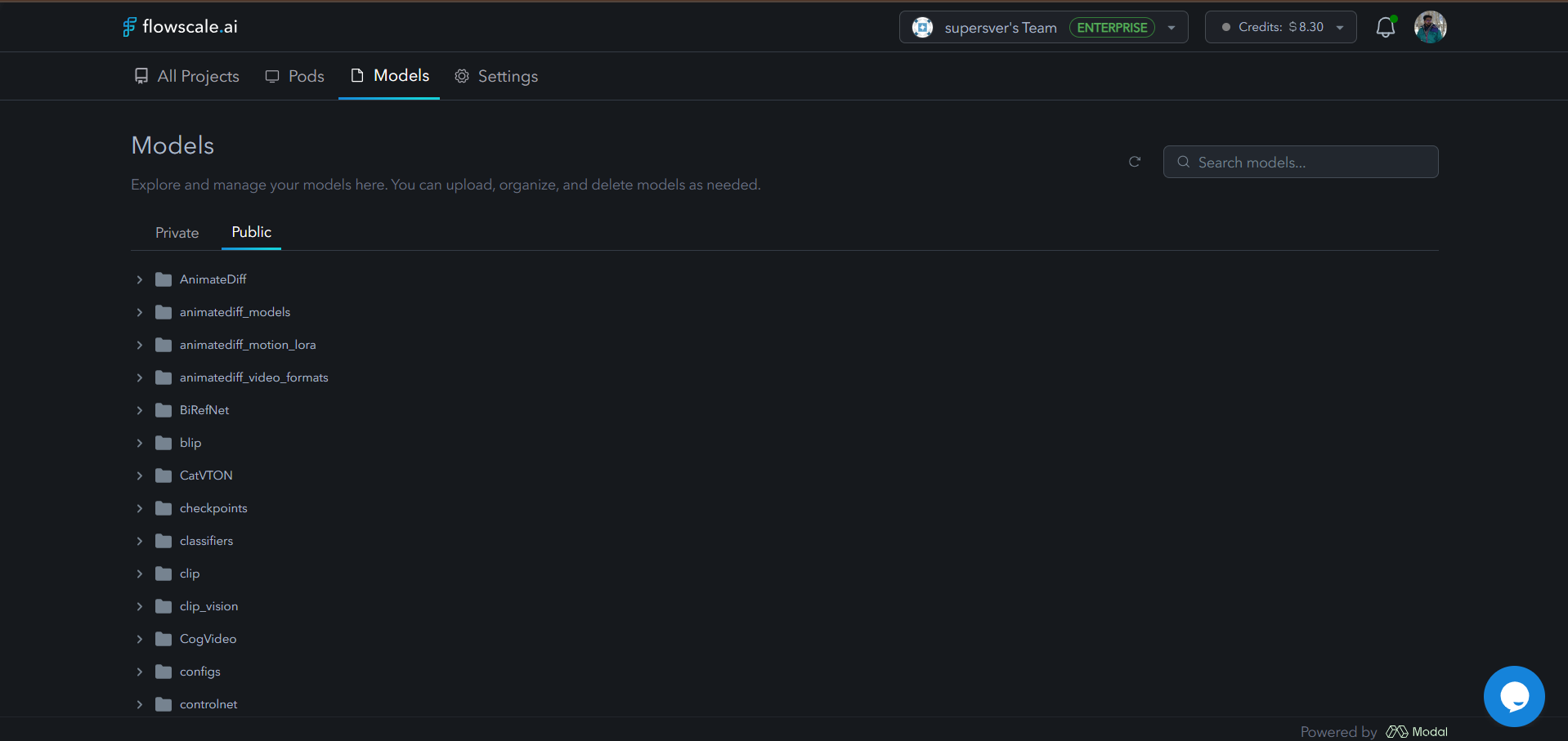
### External Models Manager
The Models Manager is now outside individual projects and sits conveniently beside Pods for easier access. Quickly locate models within expanded volume folders using the new search functionality.
 ### Upload Models from Your PC
You can now upload model files directly from your computer via the Models Manager, streamlining your workflow setup process.
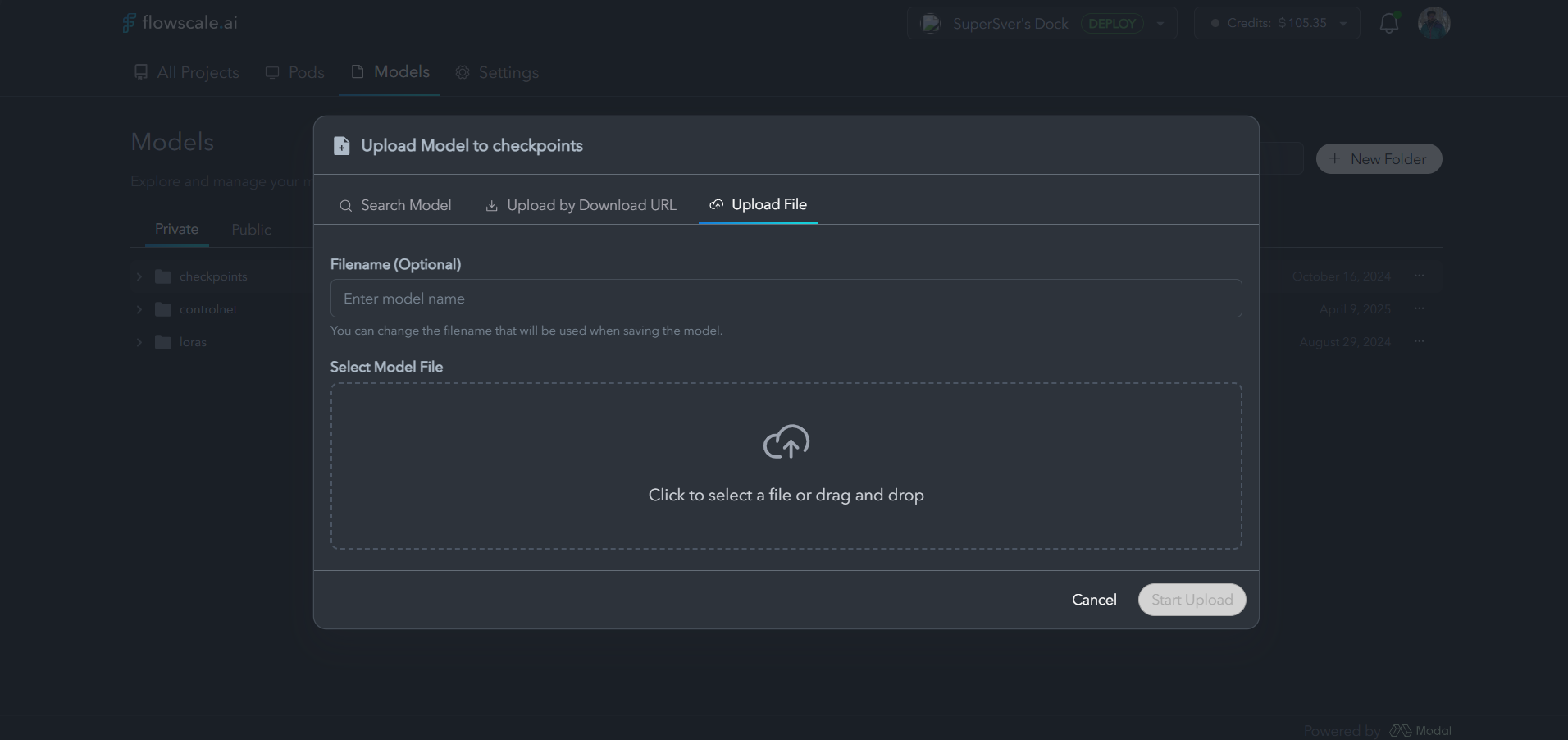
### Upload Models from Your PC
You can now upload model files directly from your computer via the Models Manager, streamlining your workflow setup process.
 ***
## 🔟 New Features
**Biggest additions to the platform:**
### Models Manager Now External
Access models outside of your project for better organization
New search bar for finding folders, including models in expanded subfolders
The Models Manager has been relocated for improved accessibility and workflow efficiency.
### New Upload Options for Models
Search and add models from sources like CivitAI and other popular model
repositories directly through the interface.
***
## 🔟 New Features
**Biggest additions to the platform:**
### Models Manager Now External
Access models outside of your project for better organization
New search bar for finding folders, including models in expanded subfolders
The Models Manager has been relocated for improved accessibility and workflow efficiency.
### New Upload Options for Models
Search and add models from sources like CivitAI and other popular model
repositories directly through the interface.
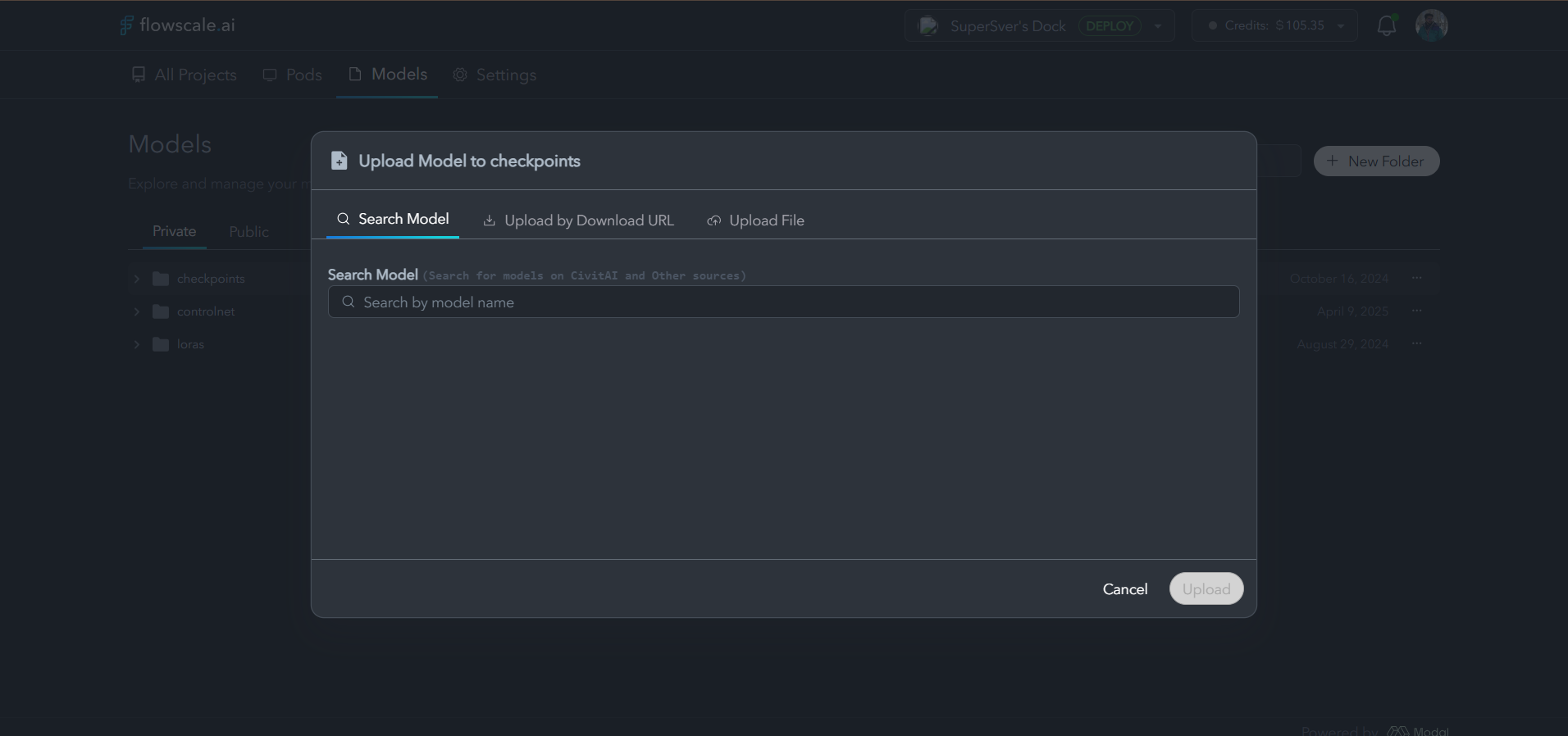 Upload models via direct download URLs for quick integration of models from
various sources.
Upload models via direct download URLs for quick integration of models from
various sources.
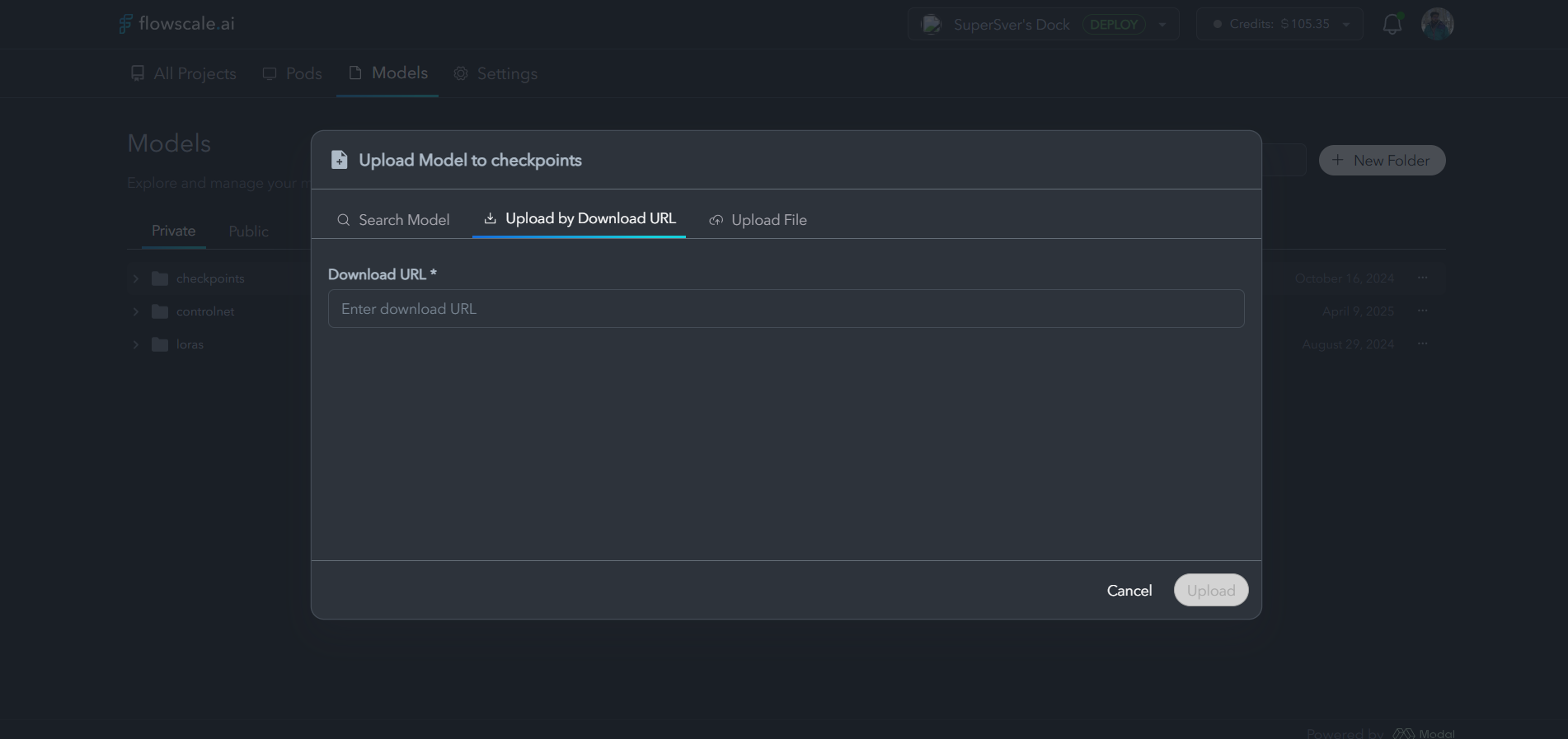 Upload model files directly from your PC with a simple drag-and-drop
interface for maximum convenience.
### Move Workflow/Folder Feature
**Enhanced Organization**
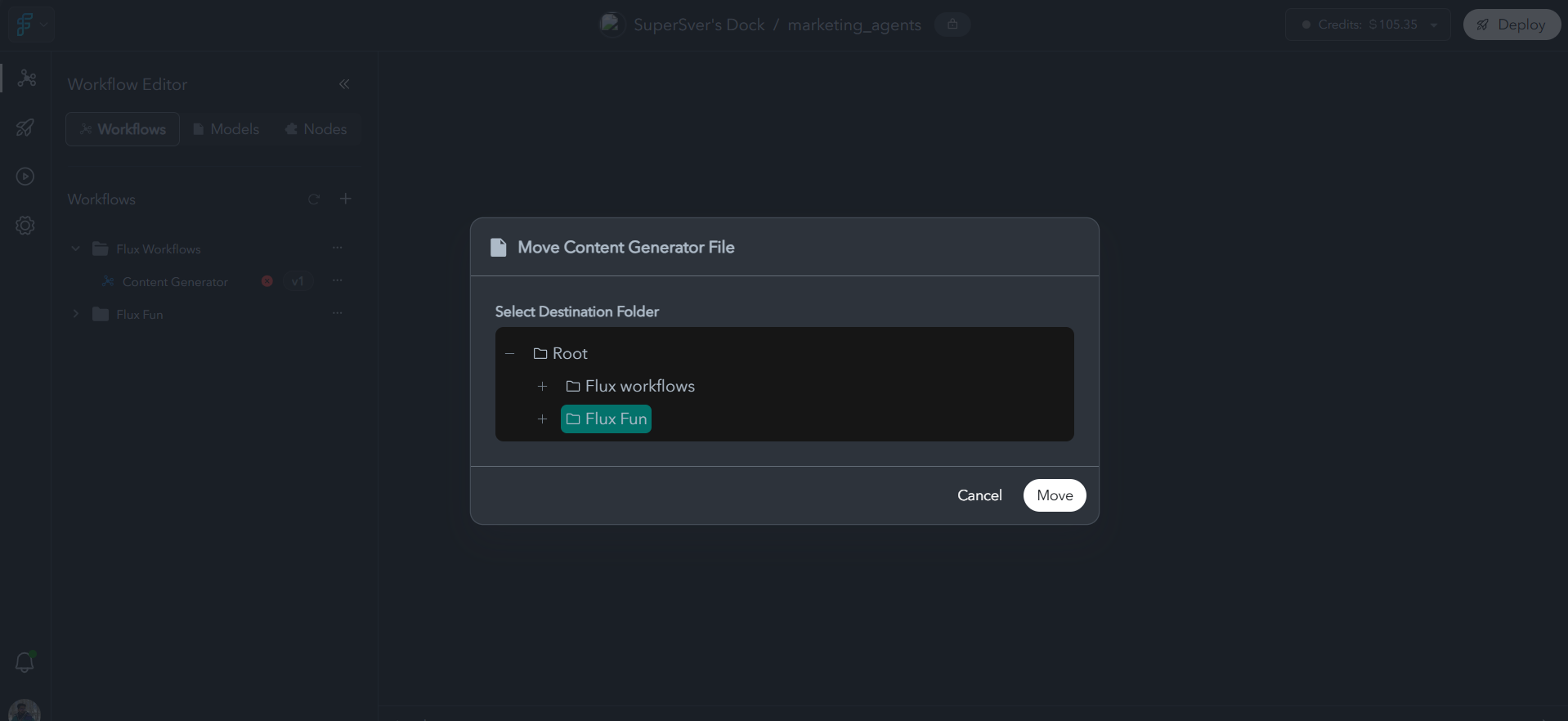
* Move workflows to any folder structure using a new, intuitive modal
* Improved project organization capabilities
* Streamlined workflow management across different project structures
Upload model files directly from your PC with a simple drag-and-drop
interface for maximum convenience.
### Move Workflow/Folder Feature
**Enhanced Organization**
* Move workflows to any folder structure using a new, intuitive modal
* Improved project organization capabilities
* Streamlined workflow management across different project structures
 ### Revamped Playground Experience
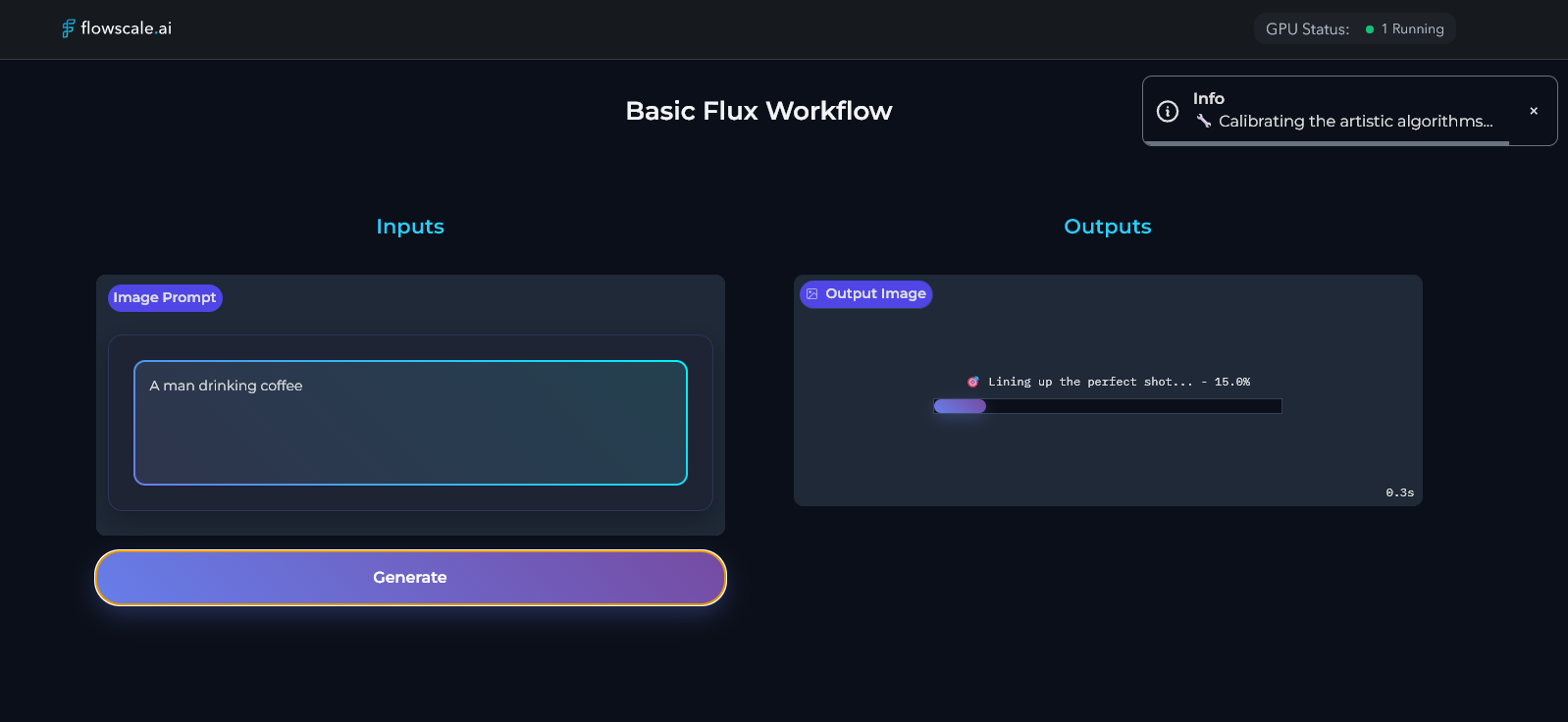
The Playground has received significant improvements for better user experience and enhanced functionality, providing a more intuitive environment for testing and iterating on your workflows.
### Revamped Playground Experience
The Playground has received significant improvements for better user experience and enhanced functionality, providing a more intuitive environment for testing and iterating on your workflows.
 ***
## 🐞 Bug Fixes
**What we squashed this release:**
### Import Workflow Modal
* **Fixed**: **Confirm** button wasn't disabled while a workflow upload was in progress
* **Fixed**: FS and Comfy Core nodes are now filtered out and won't be shown in the missing nodes list during workflow upload
* **Improved**: **'rgthree' nodes have been moved to the custom nodes accordion** instead of the missing nodes section for better clarity
### Stop Button Visibility
* **Fixed**: Stop button was not visible inside deployments when multiple deployments existed
* **Improved**: Better visibility and accessibility of deployment controls
### Workflow and Folder Management
* **Fixed**: Left sidebar keeps loading even when workflow/folder is renamed successfully
* **Improved**: More responsive interface updates after rename operations
### Generation Timeout Issues in Playground
* **Fixed**: Optimized generation to prevent timeouts when using custom nodes with long cold start times
* **Improved**: Better handling of extended processing times for complex workflows
### Pod Permissions
* **Fixed**: Some users with member role were able to see pod settings tab inappropriately
* **Improved**: More granular permission controls for different user roles
***
## 🛠️ Platform Improvements
### Performance Enhancements
**Models Management**
* **Faster model loading** with the new external Models Manager architecture
* **Improved search performance** across large model libraries
* **Reduced memory footprint** when managing multiple model files
**Workflow Organization**
* **Enhanced folder navigation** with better performance on large project structures
* **Optimized move operations** for workflows and folders
* **Improved UI responsiveness** during bulk operations
### User Experience
**Interface Improvements**
* **Streamlined Models Manager** with better visual hierarchy
* **Intuitive upload flows** with clear progress indicators
* **Enhanced drag-and-drop** functionality across the platform
* **Improved modal interactions** with better loading states
***
## 📊 Platform Usage & Impact
**3x increase** in model upload efficiency with new PC upload feature
**60% faster** workflow management with external Models Manager
**45% reduction** in time spent searching for models and organizing
workflows
**15+ bugs fixed** with improved error handling and user feedback
***
***
## 📚 Migration Guide
### Recommended Actions
Check out the new Models Manager location and organize your model libraries
Test the PC upload functionality and external source integration
Use the new move workflow feature to optimize your project structure
Models Manager has moved - update any bookmarked locations
***
## 📞 Support & Feedback
Connect with the community and get real-time support
Report issues directly to our engineering team
Explore our comprehensive documentation
***
**Enjoy the update—and streamline your workflows!** 🚀
*FlowScale AI Team*\
*July 30, 2025*
***
## 🐞 Bug Fixes
**What we squashed this release:**
### Import Workflow Modal
* **Fixed**: **Confirm** button wasn't disabled while a workflow upload was in progress
* **Fixed**: FS and Comfy Core nodes are now filtered out and won't be shown in the missing nodes list during workflow upload
* **Improved**: **'rgthree' nodes have been moved to the custom nodes accordion** instead of the missing nodes section for better clarity
### Stop Button Visibility
* **Fixed**: Stop button was not visible inside deployments when multiple deployments existed
* **Improved**: Better visibility and accessibility of deployment controls
### Workflow and Folder Management
* **Fixed**: Left sidebar keeps loading even when workflow/folder is renamed successfully
* **Improved**: More responsive interface updates after rename operations
### Generation Timeout Issues in Playground
* **Fixed**: Optimized generation to prevent timeouts when using custom nodes with long cold start times
* **Improved**: Better handling of extended processing times for complex workflows
### Pod Permissions
* **Fixed**: Some users with member role were able to see pod settings tab inappropriately
* **Improved**: More granular permission controls for different user roles
***
## 🛠️ Platform Improvements
### Performance Enhancements
**Models Management**
* **Faster model loading** with the new external Models Manager architecture
* **Improved search performance** across large model libraries
* **Reduced memory footprint** when managing multiple model files
**Workflow Organization**
* **Enhanced folder navigation** with better performance on large project structures
* **Optimized move operations** for workflows and folders
* **Improved UI responsiveness** during bulk operations
### User Experience
**Interface Improvements**
* **Streamlined Models Manager** with better visual hierarchy
* **Intuitive upload flows** with clear progress indicators
* **Enhanced drag-and-drop** functionality across the platform
* **Improved modal interactions** with better loading states
***
## 📊 Platform Usage & Impact
**3x increase** in model upload efficiency with new PC upload feature
**60% faster** workflow management with external Models Manager
**45% reduction** in time spent searching for models and organizing
workflows
**15+ bugs fixed** with improved error handling and user feedback
***
***
## 📚 Migration Guide
### Recommended Actions
Check out the new Models Manager location and organize your model libraries
Test the PC upload functionality and external source integration
Use the new move workflow feature to optimize your project structure
Models Manager has moved - update any bookmarked locations
***
## 📞 Support & Feedback
Connect with the community and get real-time support
Report issues directly to our engineering team
Explore our comprehensive documentation
***
**Enjoy the update—and streamline your workflows!** 🚀
*FlowScale AI Team*\
*July 30, 2025*